Published 26. March 2026
Introduction
In this article, we continue our workshop series on Oracle Database to PostgreSQL migration.
In Part 1, we covered the migration features introduced with KeepTool 16, including:
- creating table structures in PostgreSQL
- creating structures for multiple tables
- migrating trigger logic
- creating views in PostgreSQL
- copying data from Oracle to PostgreSQL
- rewriting SQL queries for PostgreSQL
In Part 2, we focus on the new KeepTool 17 features for migrating Oracle databases to PostgreSQL. In particular, we look at:
- migrating PL/SQL procedures, functions, and package bodies to PostgreSQL
- migrating sequences to PostgreSQL
- migrating policies to PostgreSQL
- migrating privileges to PostgreSQL
- creating comments on constraints in PostgreSQL
- combining deterministic migration tools with the AI Assistant
If you are planning an Oracle database migration to PostgreSQL, these new features can help you automate more of the conversion process while still keeping control over the final result.
Migrating PL/SQL Procedures, Functions, and Package Bodies to PostgreSQL
One of the most important steps in an Oracle to PostgreSQL migration is converting Oracle PL/SQL logic into PostgreSQL’s PL/pgSQL language.
To support this process, KeepTool helps you migrate Oracle procedures, functions, and package bodies into PostgreSQL-compatible definitions. As a result, Hora rewrites the code so it can be executed more easily in a PostgreSQL database.
Package Body Splitting
The PostgreSQL Community Edition does not support packages. Therefore, KeepTool splits each Oracle package into separate procedures and functions.
The original procedure or function name is prefixed with the package name, separated by two underscore characters:
packagename__procedurenamepackagename__functionname
This approach works well because PostgreSQL does not have Oracle’s 30-character identifier limit. In addition, it keeps procedures and functions from the same package grouped together logically.
KeepTool also creates a procedure named:
packagename__initialization
This procedure contains the logic from the original package initialization block. In other words, any code found between BEGIN ... END at the end of the package body is moved into this generated initialization procedure.
Before you call any other procedure or function from the package, make sure to execute this initialization procedure first.
Global Package Variables
Global package variables are replaced with PostgreSQL configuration parameters.
These values are always stored as varchar. At the same time, no prior declaration is required, and the names are case-sensitive.
For example, for the variable current_id in package my_package:
Read:
Write:
perform set_config(‘my_package.current_id’, <value>::varchar, false)
How to Migrate PL/SQL Logic to PostgreSQL
To start the migration, use the context menu item “DDL for PostgreSQL DB” in the PL/SQL Overview grid.
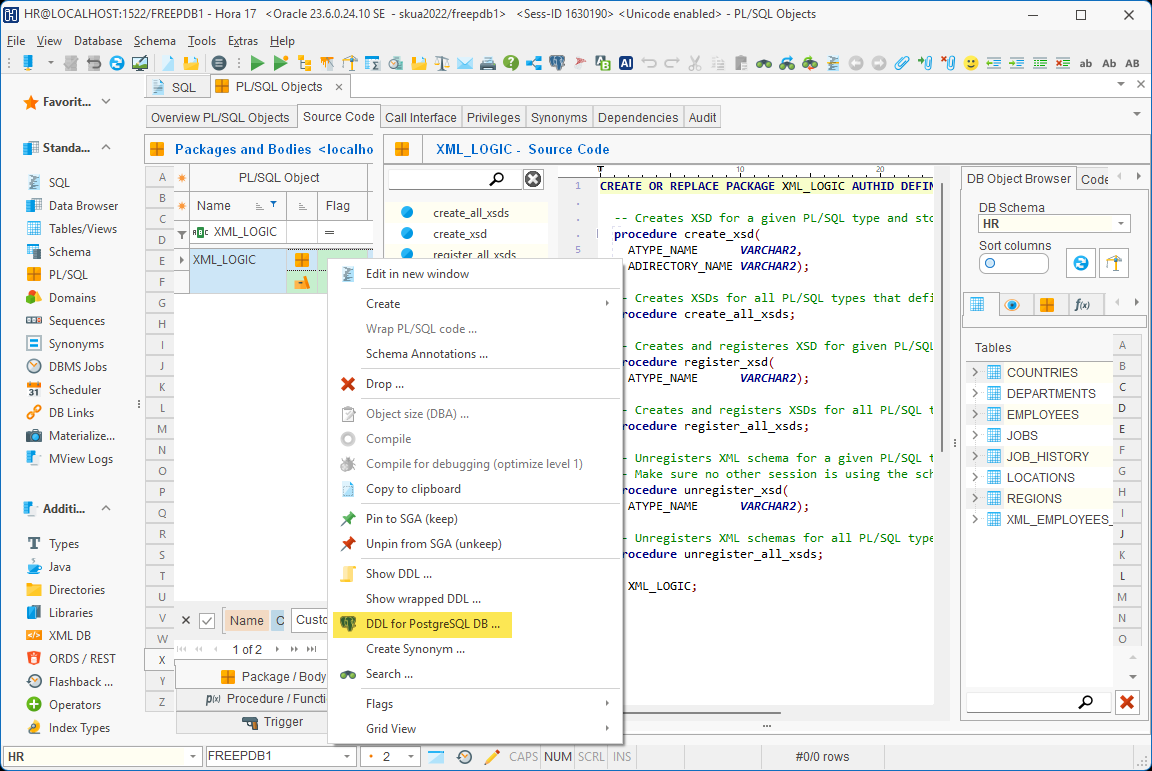
This command now supports multi-selection, so you can migrate several procedures, functions, or package bodies in a single operation. Depending on the size of the code, the process may take a few seconds. After that, Hora displays the migrated code.
The migration tool automatically converts roughly 95% of Oracle SQL statements into ANSI SQL. However, very complex statements may still require manual adjustments.
Among other things, the tool:
- declares record variables for cursor
FOR loops
- converts Oracle keywords to lowercase
- replaces Oracle-specific data types where appropriate, such as converting
DATE to TIMESTAMP(0)
- rewrites unsupported Oracle functions into PostgreSQL-compatible syntax
- inserts the
CALL keyword for procedure calls
- adapts variable declaration syntax
- converts exception handling syntax
- rewrites sequence access syntax
- and much more
After the migration, you should always run the generated code in your PostgreSQL database and check for errors.
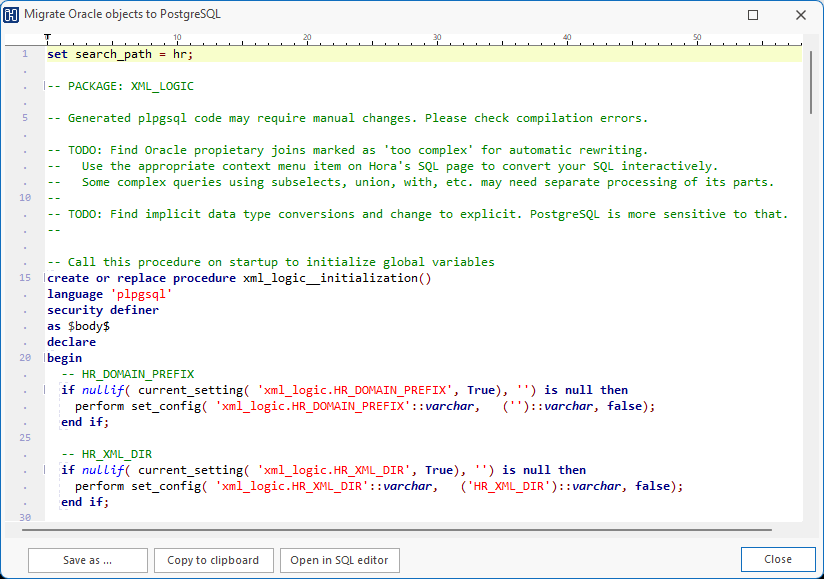
In some cases, manual changes will still be necessary. In particular, watch out for implicit data type conversions. PostgreSQL is generally stricter than Oracle, so explicit conversions may be required.
Migrating Sequences to PostgreSQL
To migrate sequences, use the context menu item “DDL for PostgreSQL DB” in the Sequences Overview grid.
Here, multi-selection is also supported, which means you can migrate several sequences in one operation. Once the process is complete, Hora displays the generated PostgreSQL code.
For teams performing a larger Oracle to PostgreSQL migration, this makes sequence conversion faster and more consistent.
Migrating Policies to PostgreSQL
To migrate policies, use the context menu item “DDL for PostgreSQL DB” in the Schema | Policies grid.
In this area, multi-selection is available as well, so several policies can be migrated at once. When the conversion is finished, Hora displays the resulting code.
As a result, policy migration becomes easier as part of a broader PostgreSQL modernization project.
Migrating Object Privileges to PostgreSQL
Object privileges are migrated automatically together with the database objects you convert to PostgreSQL. In addition, the corresponding GRANT statements are appended to the generated DDL.
This is especially important for procedural logic, because PostgreSQL privilege syntax differs significantly from Oracle. For example, in PostgreSQL, grants for procedures and functions must include the full list of formal parameter types.
KeepTool handles this syntax generation automatically, thereby saving time and reducing errors during migration.
Creating Comments on Constraints in PostgreSQL
Hora automatically generates comments for constraints. This is a useful PostgreSQL feature that is not available in Oracle in the same way.
These comments can be used in applications to create more user-friendly error messages for constraint violations. For example, a typical approach is:
- read the constraint name from the original PostgreSQL error message
- look up the comment for that constraint
- then display the comment as a meaningful message in the application
You can also fine-tune the generated comments manually, so that they become even more helpful for end users.
Deterministic Migration Tools Versus the AI Assistant
When planning an Oracle to PostgreSQL migration, you may wonder whether it is better to rely on KeepTool’s built-in migration tools or on AI-based logic.
AI is improving rapidly, and it is also available directly within our tools. However, AI still has one important limitation: it is based on probabilities, not deterministic rules. As a result, the same prompt may produce slightly different results over time.
This is where deterministic migration tools have a clear advantage. Every time you run them, they produce the same result, and therefore they provide consistency. That consistency is extremely valuable in large migration projects.
Even if some manual post-processing is still required, deterministic tools provide a stable and repeatable starting point. Afterwards, you can use the integrated AI Assistant for any remaining refinement work, such as polishing edge cases or improving readability.
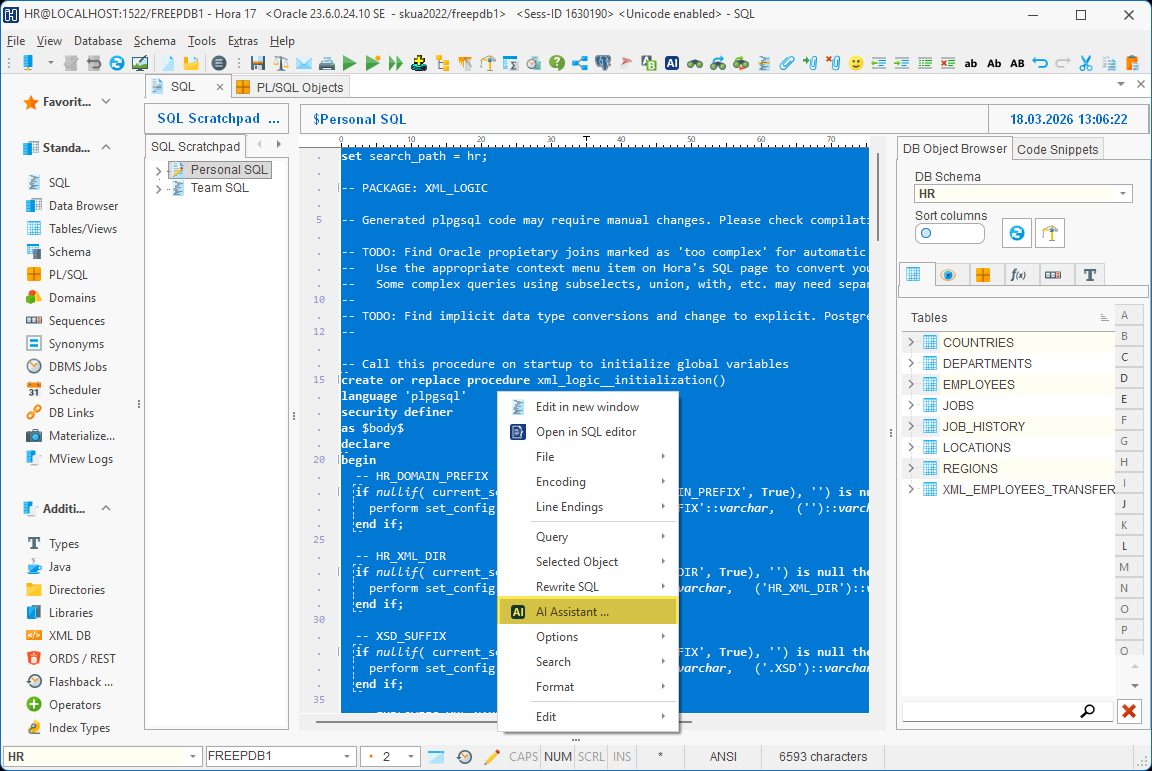
In practice, the best approach is often to combine both:
- use KeepTool’s deterministic migration logic for the core conversion
- then use the AI Assistant for post-processing and final adjustments
Summary
With KeepTool 17, Oracle to PostgreSQL migration becomes even more comprehensive.
You can now migrate not only tables, views, triggers, and SQL statements, but also PL/SQL logic, sequences, policies, privileges, and constraint comments.
Overall, the result is a more complete and consistent migration workflow that combines the reliability of deterministic conversion with the flexibility of AI-assisted refinement.
If you are planning an Oracle database migration to PostgreSQL, KeepTool 17 gives you a practical and efficient way to accelerate the process while keeping control over the final result.
➡️ Try KeepTool for free
KeepTool's Oracle tools are designed specifically for developers, DBAs, and support teams.
Based on over 25 years of experience, we continuously optimize our software to make your database analysis and documentation faster, more efficient, and clearer.