Published 20. September 2022
Updated October 2025
Introduction
KeepTool’s Oracle tools (starting from version 15) support advanced security features like SQL*Net encryption and data integrity checksumming. These features help protect database traffic and ensure tamper detection.
In this article, we’ll show:
-
How to enable SQL*Net encryption and checksumming on both server and client
-
How KeepTool (and Hora) supports these features — even with its direct TCP/IP mode
-
How to monitor which sessions are encrypted and which aren’t
Let’s dive in.
Enabling SQL*Net Encryption on the Database Server
On the server side, make adjustments to the sqlnet.ora file:
  SQLNET.ENCRYPTION_SERVER=REQUIRED
  SQLNET.ENCRYPTION_TYPES_SERVER = (AES256,DES)
-
SQLNET.ENCRYPTION_SERVER accepts values such as ACCEPTED, REJECTED, REQUESTED, or REQUIRED.
-
SQLNET.ENCRYPTION_TYPES_SERVER lists allowed algorithms (e.g. AES256, DES).
If omitted, all algorithms are permitted by default.
You can find Oracle’s official list of valid encryption methods in their documentation.
Enabling SQL*Net Encryption on the Client
On your client or workstation, you mirror the settings in its own sqlnet.ora:
  SQLNET.ENCRYPTION_CLIENT=REQUIRED
  SQLNET.ENCRYPTION_TYPES_CLIENT = (AES256)
-
SQLNET.ENCRYPTION_CLIENT follows the same value options as on the server.
-
The encryption negotiation between client and server determines if traffic is encrypted, unencrypted, or rejected.
Oracle provides a negotiation matrix showing allowable combinations of server/client encryption settings.
Using Encryption with Direct TCP/IP Connections
KeepTool supports direct TCP/IP connections (i.e., bypassing the Oracle client) by parsing connection string syntax. For example, connect strings like:
trigger a direct TCP/IP mode instead of a traditional SQL*Net mode.
Since direct TCP/IP doesn’t use sqlnet.ora, encryption can’t be set in the usual files. Instead, KeepTool provides configuration in the Direct TCP/IP settings pane.
You’ll find a combo box labeled “Encryption” (highlighted in green). Default: “Accepted”, but you can switch to “Required” to enforce encryption. (The “Requested” option is currently disabled/greyed out.)
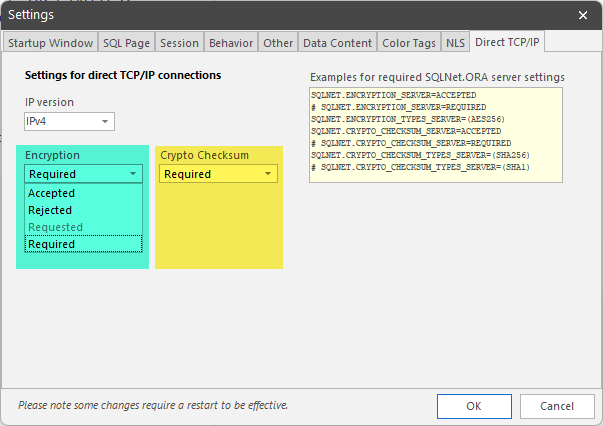
Direct TCP/IP settings for encryption
Important:
-
To allow encryption, set it to Accepted
-
To force encryption, use Required
Monitoring Network Encryption in Hora
Hora adds dedicated support so you can check which sessions use encryption:
-
Open Sessions > Network client tab
-
It displays a grid of adapter modules loaded by the session—if an encryption adapter is loaded, that connection is encrypted (SQLNET.ENCRYPTION).
-
Below the grid, it shows additional client info (e.g. OCI version, character set)
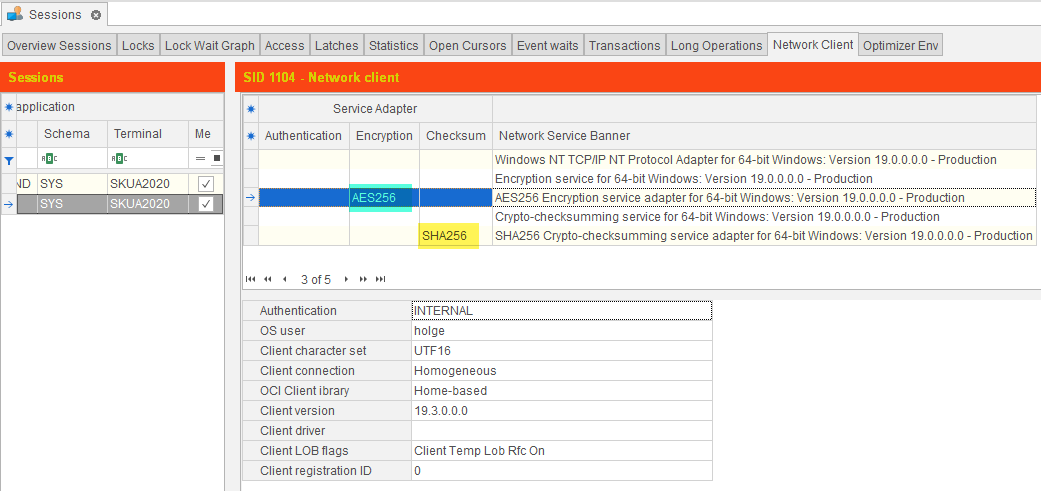
Viewing Network Encryption Details for a DB session in Hora
On the regular Sessions overview grid, a new column “Encryption” appears under Client machine.
Encrypt-enabled sessions are highlighted (e.g. in green) so you can immediately see which connections are secured.
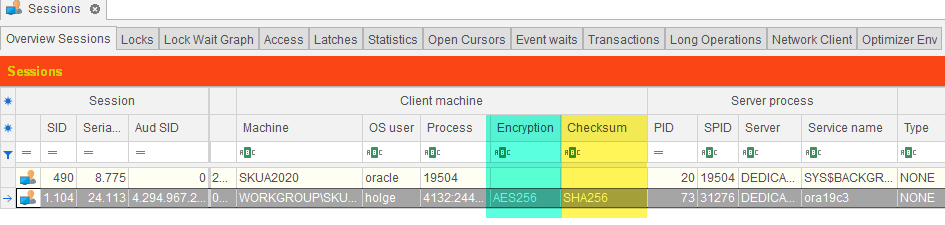
Network Encryption Information in Hora’s Session Monitor
This visibility makes it straightforward to audit your environment’s security compliance.
Data Integrity Checksums (Crypto Checks)
There is another data security feature for data integrity. It can be configured very similar to the SQL*Net encryption using sqlnet.ora parameters:
In addition to encryption, you can also enable checksumming to protect against data tampering. Configuration is similarly controlled via sqlnet.ora:
On Server:
  SQLNET.CRYPTO_CHECKSUM_SERVER
  SQLNET.CRYPTO_CHECKSUM_TYPES_SERVER
On Client:
  SQLNET.CRYPTO_CHECKSUM_CLIENT
  SQLNET.CRYPTO_CHECKSUM_TYPES_CLIENT
These accept the same negotiation values as encryption settings.
Supported checksum algorithms (Oracle 12c+) include MD5, SHA1, SHA256, SHA384, SHA512.
If no algorithm is specified, SHA256 is used by default.
In direct TCP/IP mode, KeepTool also provides a “Crypto checksum” combo box, paralleling SQL*Net settings.
The Sessions grid also displays a “Checksum” column (highlighted, e.g., yellow) to show which connections have checksum enabled.
Conclusion
-
You can combine SQL*Net encryption and checksumming even when using direct TCP/IP connections.
-
Hora shows you the state of both features per session so you can monitor which connections are encrypted and which are not.
-
This gives you real-time visibility into your compliance with security policies and helps you spot unencrypted or unverified traffic easily.
➡️ Try KeepTool for free
KeepTool's Oracle tools are designed specifically for developers, DBAs, and support teams.
Based on over 25 years of experience, we continuously optimize our software to make your database analysis and documentation faster, more efficient, and clearer.