Published 03. March 2023
Updated October 2025
Introduction
Hello again. In our two-part series, we’re showing how to use KeepTool 15 together with Oracle XML DB. In the first article, we covered building a working import interface for HR.EMPLOYEES. Now we’ll focus on the complementary export interface — specifically handling a master/detail relationship between HR.COUNTRIES (master) and HR.LOCATIONS (detail). As before, we keep things focused on essentials, giving you ample flexibility to extend as needed.
Creating PL/SQL types
We intend to export data from both COUNTRIES and LOCATIONS in the HR schema. Since there is a foreign-key relation from LOCATIONS to COUNTRIES, our XML must nest the detail (LOCATIONS) inside the master (COUNTRIES).
On the “Tables” page in Hora, the master/detail tab shows a small diagram of direct relationships. We flagged both COUNTRIES and LOCATIONS to make clear which tables this export example will involve.
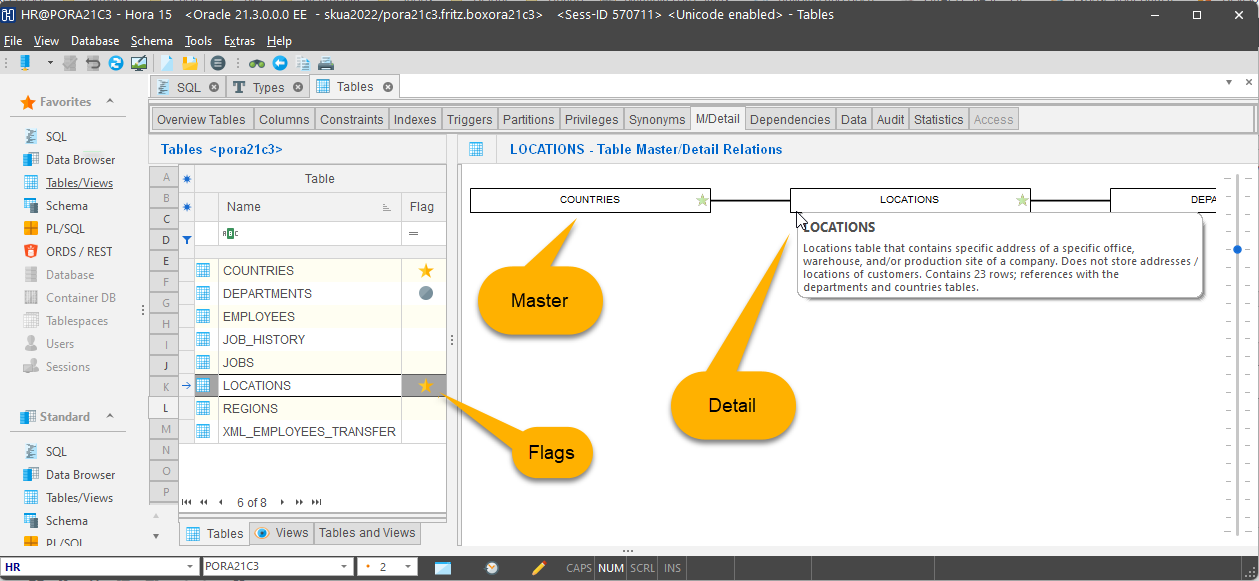
Flagging both the COUNTRIES table (master) and the LOCATIONS table (detail) to highlight the tables to be exported.
To support nested XML export, we define six PL/SQL types — three for each table, linked to each other:
Detail table (LOCATIONS):
-
LOCATIONS_XML_ITEM: object type, attribute names match columns of the LOCATIONS table
-
LOCATIONS_XML_LIST: a collection type (TABLE OF LOCATIONS_XML_ITEM)
-
LOCATIONS_XML_ELEM: object type that wraps one LOCATIONS_XML_LIST (so it can be embedded)
We need this to let the master type reference detail collections.
Master table (COUNTRIES):
-
COUNTRIES_XML_ITEM: object whose attributes mirror columns in COUNTRIES, plus one attribute of type LOCATIONS_XML_ELEM to hold nested detail data
-
COUNTRIES_XML_LIST: collection type (TABLE OF COUNTRIES_XML_ITEM)
-
COUNTRIES_XML_ELEM: wrapper object containing one COUNTRIES_XML_LIST
Once you’ve created all six, you can inspect them in Hora’s PL/SQL Types page under the All types tab (which shows both object and collection types in one combined list).
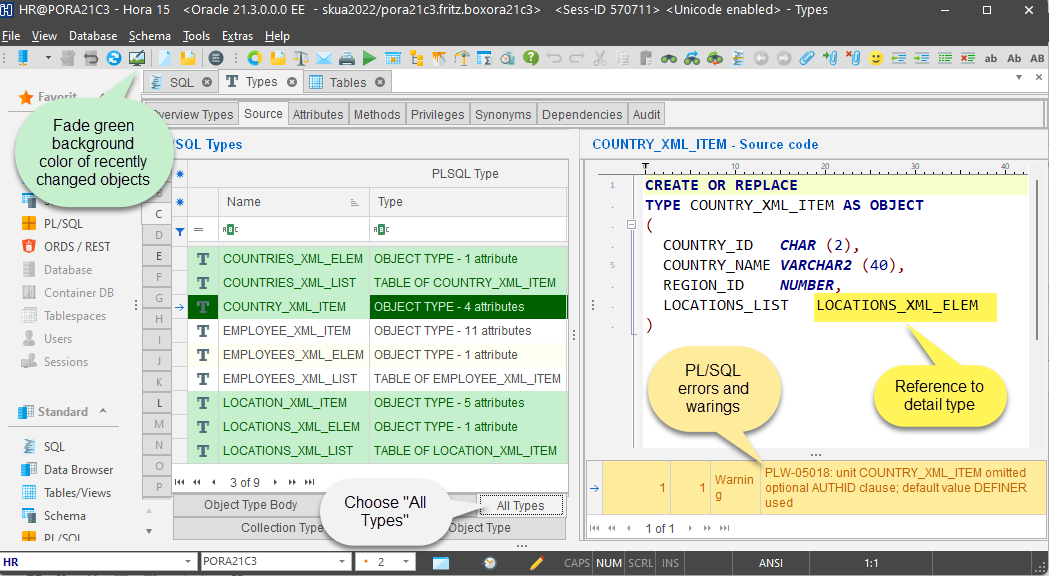
Creating 3 XML types for each table to define the XML export structure
Hora highlights recently changed types with a green background. Over time, the color fades back to the default. You can click the “fade changes” button in the upper-left (up to three times) to reset the background.
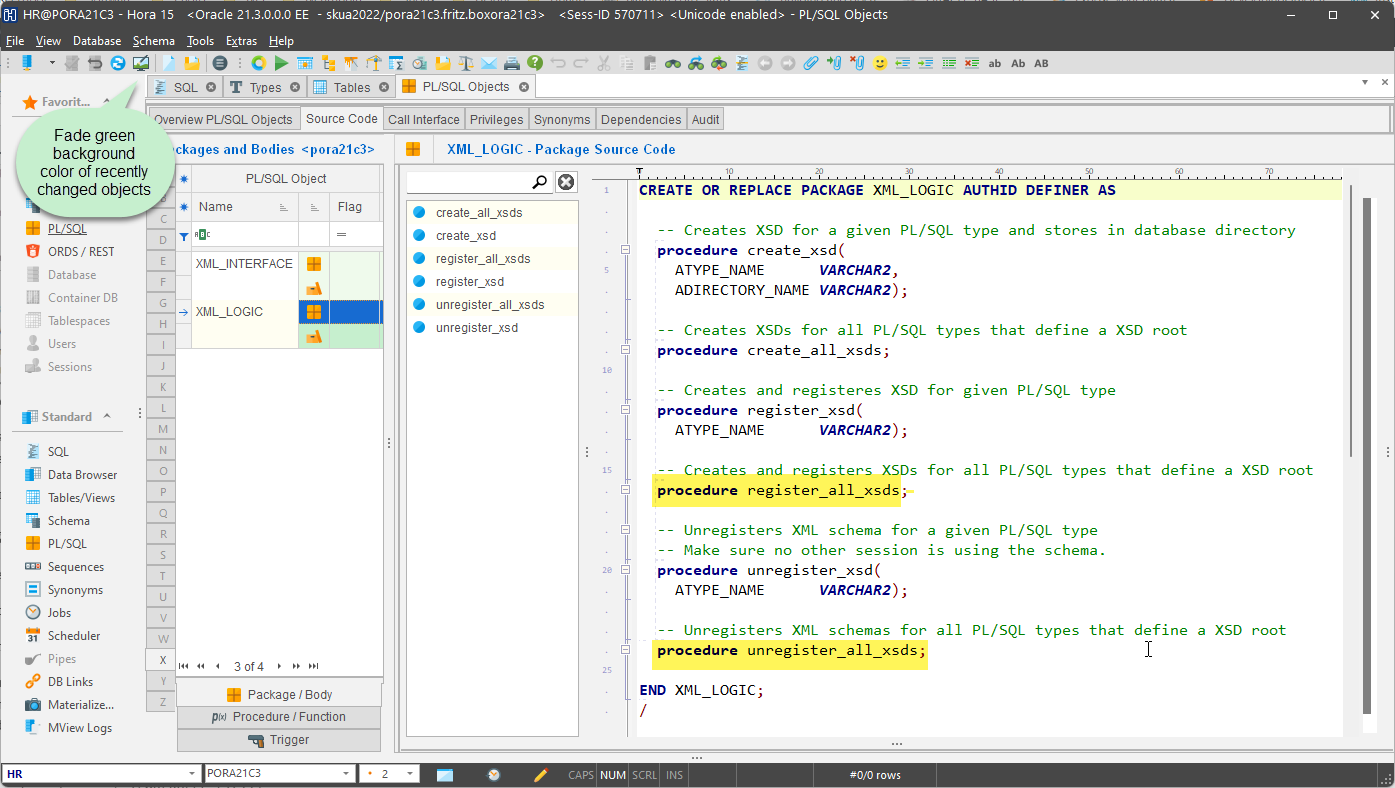
Hora displays recently changed objects using a green background that fades as time goes by or when enforced
Hora also continues to display any warnings or database errors automatically.
Creating / Registering the XSD Schema
In our first post, we built the XML_LOGIC package, which generated and registered the EMPLOYEES.XSD schema for import. Now we expand it to support export as well, via a new COUNTRIES.XSD schema.
We update XML_LOGIC to include:
Run the following:
begin
  XML_LOGIC.unregister_all_xsds;
  XML_LOGIC.register_all_xsds;
end;
/
Once executed, both XSDs are registered in the database. In Hora’s XML page you will then see:
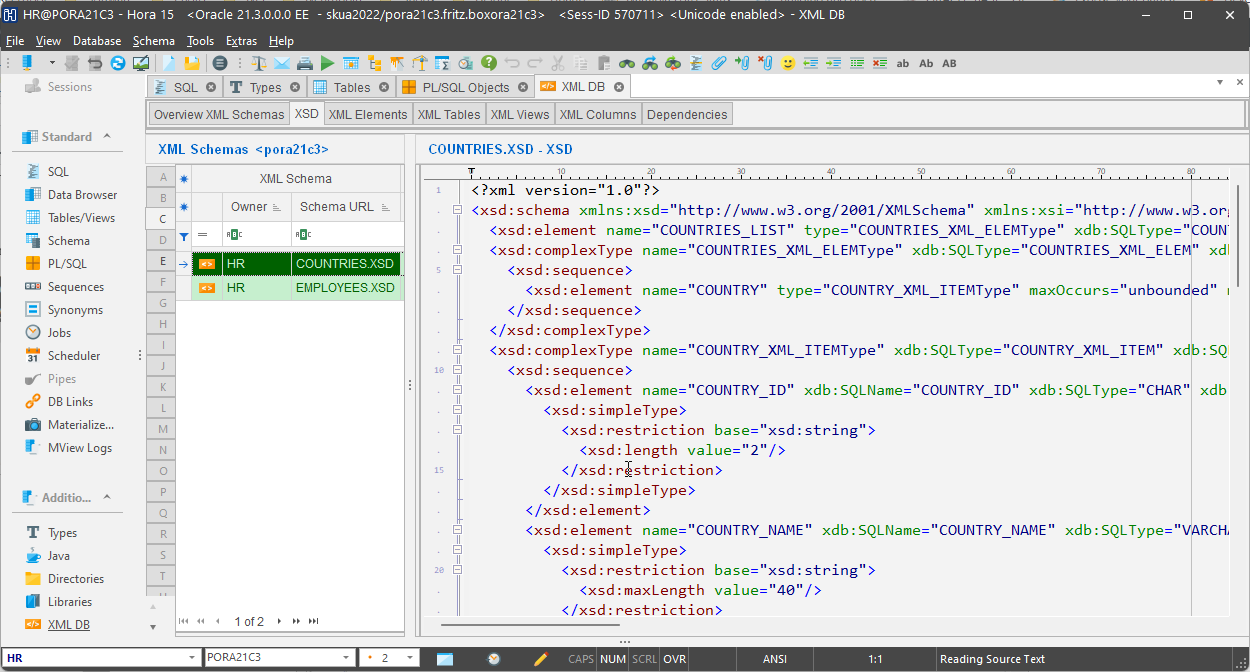
Hora displays the created XSD
- On another tab, the mapping of XML elements to PL/SQL types, now showing the nested master/detail structure
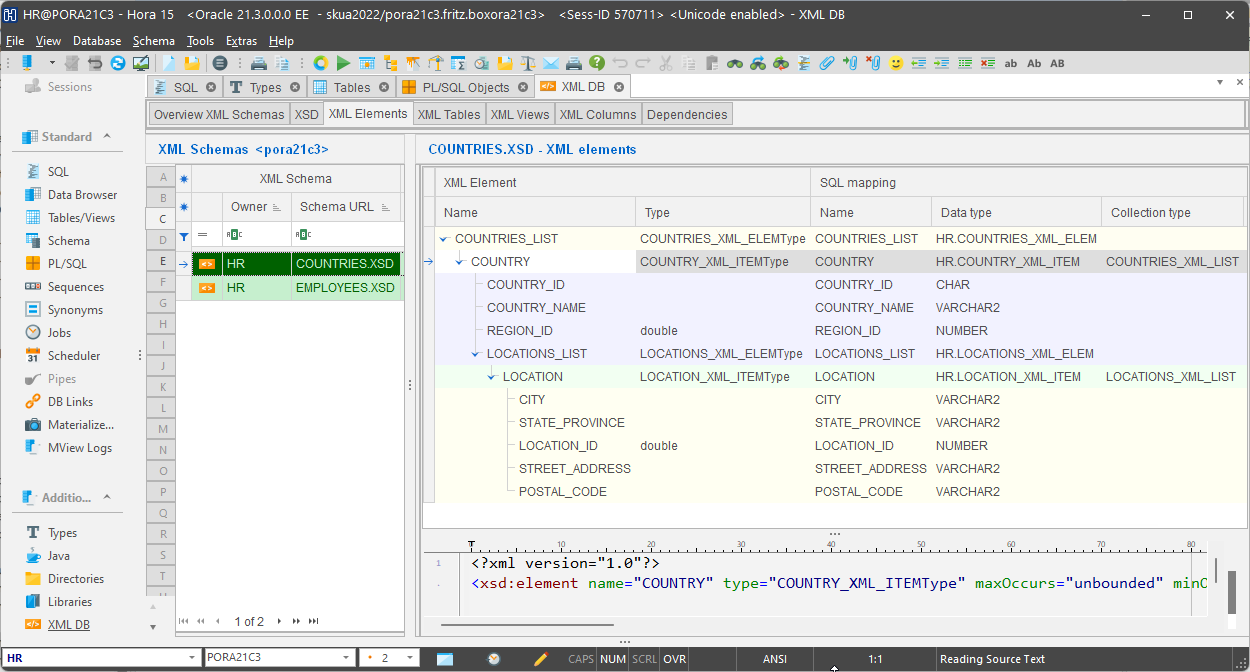
Hora shows the mapping of XML elements to PL/SQL types
Note that the newly registered XSD now supports a nested COUNTRIES → LOCATIONS hierarchy.
Interface Table for Data Export
We define the XML_COUNTRIES_TRANSFER table as our export interface — downstream consumers read from this table.
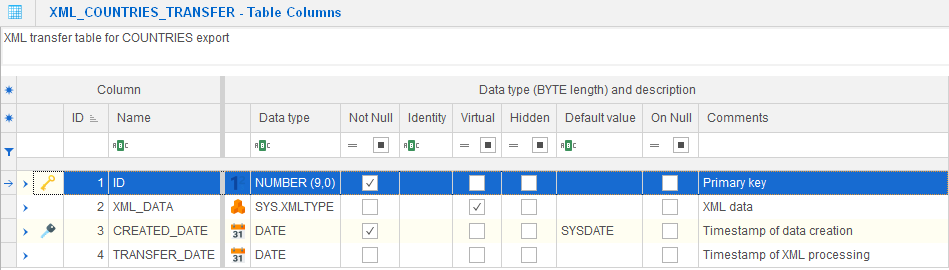
Data structure to store XML exports
Important columns:
-
ID: primary key, populated by a trigger using a sequence
-
XML_DATA: CLOB column containing the generated XML
-
Additional columns: metadata, timestamps, status fields
We also create a view XML_COUNTRIES_TRANS_DATA_V that joins COUNTRIES and LOCATIONS, assembling data into a relational form aligned with our desired XML structure:
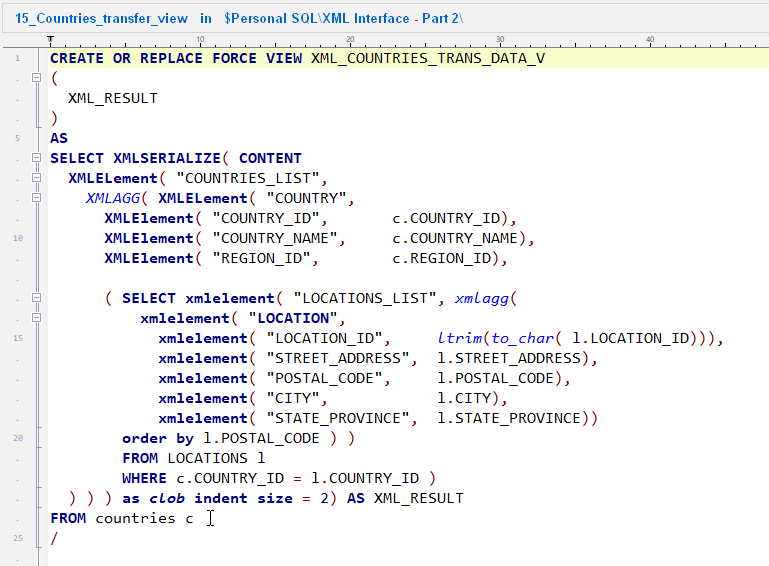
Creating a view that displays the hierarchical XML export as a relational structure
This view returns hierarchical data in a relational result set; our export logic will select from this view and insert those results as XML into the transfer table.
For more on relational-to-XML techniques, see resources like XMLTABLE conversion (e.g. via oratable): https://www.oratable.com/xmltable-convert-xml-to-relational-form/ .
Export Logic (PL/SQL)
We enhance the XML_INTERFACE package with a new procedure to perform the XML export:
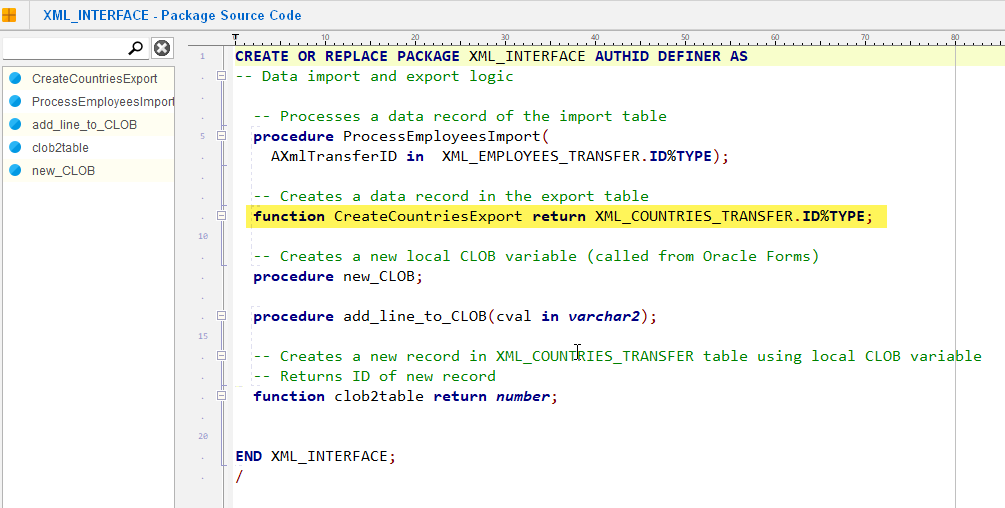
PL/SQL package that encapsulates all the XML export logic
Usage example:
declare
  XmlCountriesTransferID XML_COUNTRIES_TRANSFER.ID%TYPE;
begin
  XmlCountriesTransferID := XML_INTERFACE.CreateCountriesExport;
end;
This returns the primary key ID of the newly inserted export record.
Once inserted, you can inspect the XML_DATA column in Hora to view the generated XML.
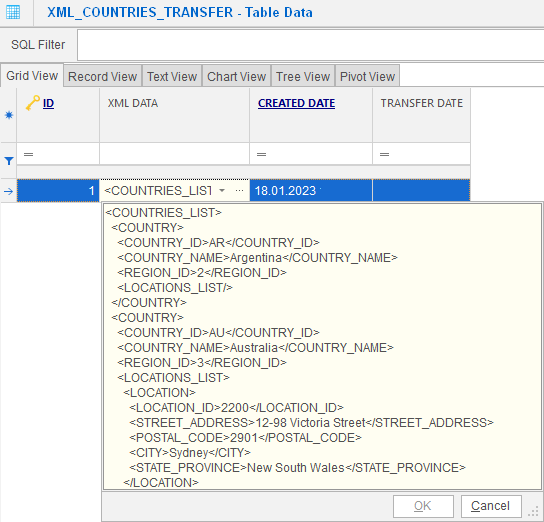
Viewing XML export data in Hora’s data content browser
External systems can then query XML_COUNTRIES_TRANSFER to fetch the export:
Conclusion
Your XML export interface is now functional. You’re free to download our example as a template and adapt it for your own master/detail export scenarios.
Teams working with similar architectures report noticeable productivity gains when using KeepTool + Oracle XML DB for XML-based interfaces.
➡️ Try KeepTool for free
KeepTool's Oracle tools are designed specifically for developers, DBAs, and support teams.
Based on over 25 years of experience, we continuously optimize our software to make your database analysis and documentation faster, more efficient, and clearer.